Jump to content
View in the app

A better way to browse. Learn more.

The Uniform Server Community

A full-screen app on your home screen with push notifications, badges and more.

To install this app on iOS and iPadOS
  1. Tap the Share icon in Safari
  2. Scroll the menu and tap Add to Home Screen.
  3. Tap Add in the top-right corner.
To install this app on Android
  1. Tap the 3-dot menu (⋮) in the top-right corner of the browser.
  2. Tap Add to Home screen or Install app.
  3. Confirm by tapping Install.

wishbone

Member
  • Joined

  • Last visited

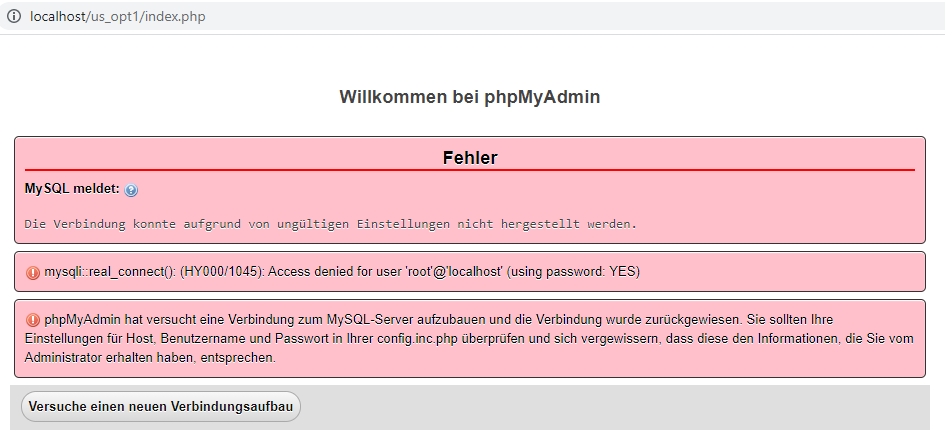
  1. the answer is: Mysql->"Restore default password (root)" - though I hadn't changed anything. Hint: root password is set ("root")! though intro "Enter new MySQL root password or press cancel:" suggests, if cancel, there is no password.' Would have saved me a lot of time, if I had known.
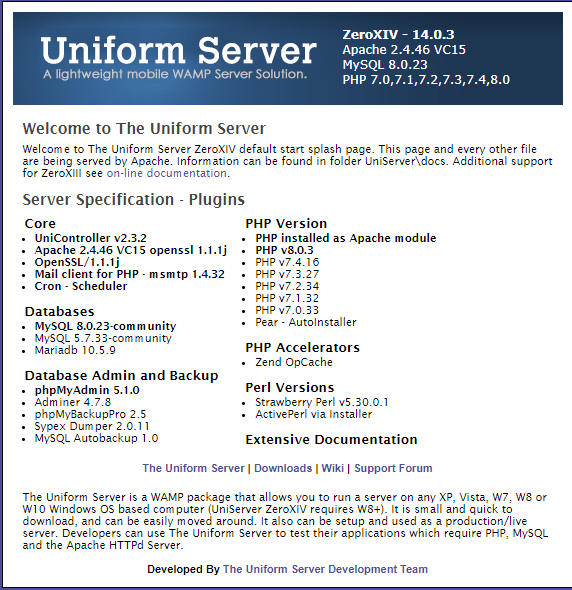
  2. Suddenly can't access the databases via phpmyadmin any more. CMS works allright! See error message and Uniserver info attached.
  3. No help for my problem? can't install PHP5, see first post.
  4. thx! Mine came only withg PHP8 installed. As I said, I successfully installed PHP7.4 But my problem: PHP5 doesn't install. I need PHP5.3.
  5. wishbone joined the community
  6. Hello, Uniserver Zero XIV 14.0.3 comes with PHP8. Greyed out are different PHP7 versions, but I can't activate them. Installed PHP 7.4 module - worked. Means, Uniserver14 doesn't come with different versions preinstalled. But my problem: Also, I tried to install an old version, PHP5 from this site, installed it, a folder core/php53 was created - but doesn't appear in the list of selectable PHP versions.

Account

Navigation

Search

Configure browser push notifications

Chrome (Android)
  1. Tap the lock icon next to the address bar.
  2. Tap Permissions → Notifications.
  3. Adjust your preference.
Chrome (Desktop)
  1. Click the padlock icon in the address bar.
  2. Select Site settings.
  3. Find Notifications and adjust your preference.