Jump to content
View in the app

A better way to browse. Learn more.

The Uniform Server Community

A full-screen app on your home screen with push notifications, badges and more.

To install this app on iOS and iPadOS
  1. Tap the Share icon in Safari
  2. Scroll the menu and tap Add to Home Screen.
  3. Tap Add in the top-right corner.
To install this app on Android
  1. Tap the 3-dot menu (⋮) in the top-right corner of the browser.
  2. Tap Add to Home screen or Install app.
  3. Confirm by tapping Install.

chros

Member
  • Joined

  • Last visited

Everything posted by chros

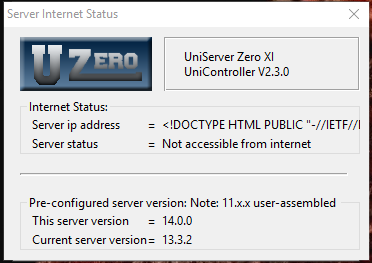
  1. Hello everyone, I am sorry if this topic is generally discussed or an easy fix. I have been scouring the internet for a solution and have not been able to find one. I just installed Uniserver v2.3.0 trying to set something up. I have never used this program before. When I go to General > Server Internet Status, I do not get my IP address. Instead I get: <!DOCTYPE HTML PUBLIC "-//EFT//.... At which point it gets cut off. Any idea of what may be causing this? Screenshot of the error is attached. I also changed from the default port to port 8080 (since something fundamental was occupying the default port). I also port-forwarded 8080. Thank you in advance.
Account

Navigation

Search

Configure browser push notifications

Chrome (Android)
  1. Tap the lock icon next to the address bar.
  2. Tap Permissions → Notifications.
  3. Adjust your preference.
Chrome (Desktop)
  1. Click the padlock icon in the address bar.
  2. Select Site settings.
  3. Find Notifications and adjust your preference.