teamayu
Member
-
Joined
-
Last visited
-
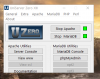
Good to see a new version, but on Windows 10, the Uniform Server window is too small on launch and is hiding some of the controls. Screenshot enclosed.
-
It`s no problem, I can use Neard. But Neard is fairly slow compared to Uniform Server.
-
What about PHP7.2? That`s the main concern now. I assume we can`t just download that expecting it to work?
-
PHP7.1.9 just came out, so just updated to that. I`ll try and post some downloads on the forum when I get chance. Might be useful for others.
-
Yes, it`s pretty easy. I`ve updated my installation to all latest php branches now, so I`m pretty happy with that.
-
OK, it is easy to upgrade from the php.net downloads, so I now have PHP7.1.8 Thanks olajideolaolorun, didn`t realise it was that easy.
-
Thanks for the update olajideolaolorun, glad to hear the project is alive. Ok, I`ll have a go with updating PHP if it`s not so difficult.
-
Yes, seems that way. Pity. Would have been nice to see a message on the homescreen, so we know what`s going on. I`ve given it long enough in the hope an update would appear, so I`m primarily using Neard now. http://neard.io/ And I agree with Obsdark, hopefully we see US on Github someday.
-
No reply, so doesn`t look good.
-
I`ve also been wondering the same thing. 7.0.16 and 7.0.17 have also been released this year. Shame to see this brilliant software die. I also use Neard, which is good, but nowhere near as lightweight as U.S. Would be at least nice to know this project isn`t dead?