All Activity
- Last week
-
 Is ther any update about this?
 -
 In the 2026 gaming market, full of complex 3D graphic masterpieces, Ragdoll Archers still comfortably sits among the top most played Web and Mobile games. Without requiring high-end specifications or a complicated storyline, what makes it so successful? Let's look at the four core reasons below. 1. Ragdoll Physics Mechanism: The combination of skill and laughter. The keyword "Ragdoll physics" always has a special appeal. In the game, your character doesn't stand still but is always in a "floppy" state like a rag doll. Unpredictability: Aiming while your body is swaying creates a challenge that is both frustrating and stimulating. High entertainment value: The absurd falls and movements of opponents when hit by arrows create hilarious moments, perfect for creating clips for TikTok or YouTube Shorts. 2. Extremely deep Progression System. A mistake many minimalist games make is being too simple. Ragdoll Archers is different. The game has a light but addictive RPG system: Diverse arrows: Players never get bored as they can unlock poison arrows, explosive arrows, or even chainsaw arrows. Stat optimization: Upgrading HP, Stamina, and damage gives players a goal to strive for (grinding) after each game. 3. Diverse game modes: From solo to direct combat. Community accessibility is a key factor in the game's widespread popularity: PvP (Player vs Player): The 2-player mode on the same screen makes Ragdoll Archers a perfect "party" game for friends. Co-op mode: Surviving together against waves of enemies increases the strategic aspect and strengthens the bond between players. 4. Optimized experience across all platforms Whether you're using a PC, tablet, or smartphone, Ragdoll Archers runs incredibly smoothly. Fast loading speed: As an HTML5 game, you can jump into the action after just a few seconds of waiting. One-touch controls: The intuitive drag-and-drop mechanism allows even non-hardcore gamers to get used to it immediately. Summary of Ragdoll Archers' strengths: Feature Benefits for players Minimalist graphics Doesn't strain the eyes, runs smoothly on low-end devices Ragdoll physics Creates laughter and unique difficulty Arrow system Increases tactical depth and provides a novel experience 2-player mode Increases social interaction Conclusion: Ragdoll Archers is not just an archery game; it's a test of patience and skill wrapped in a humorous package. If you're looking for a game to relieve stress but still want a sense of accomplishment, this is the number one choice.
 -
limecharlie joined the community
- Earlier
-
 I'm really impressed with the content you shared. With the updated information, it's entirely possible to research more by pointing to C:/UniServerZ/www/project2 with the correct domain.
 -
fracturerefuse joined the community
-
 Hey, there are two main issues: Check the DLL file names in production.ini exactly match the files in the extensions folder (e.g., php_sqlsrv_74_nts_x64.dll, not php_sqlsrv_7_nts_x86.dll). Most importantly, you need to install the Microsoft ODBC Driver for SQL Server on your system; without it, the extension won't load.
 -
ilyacolton joined the community
-
thanks.. for such guidance
-
 Thank you!
 -
 DubaiRealEstate joined the community
 -
 ThailandRealEstate joined the community
 -
 The Uniform Server project is open to new contributors. If you’re interested in helping continue its development, please let us know.
 -
 Barcelona Real Estate joined the community
 -
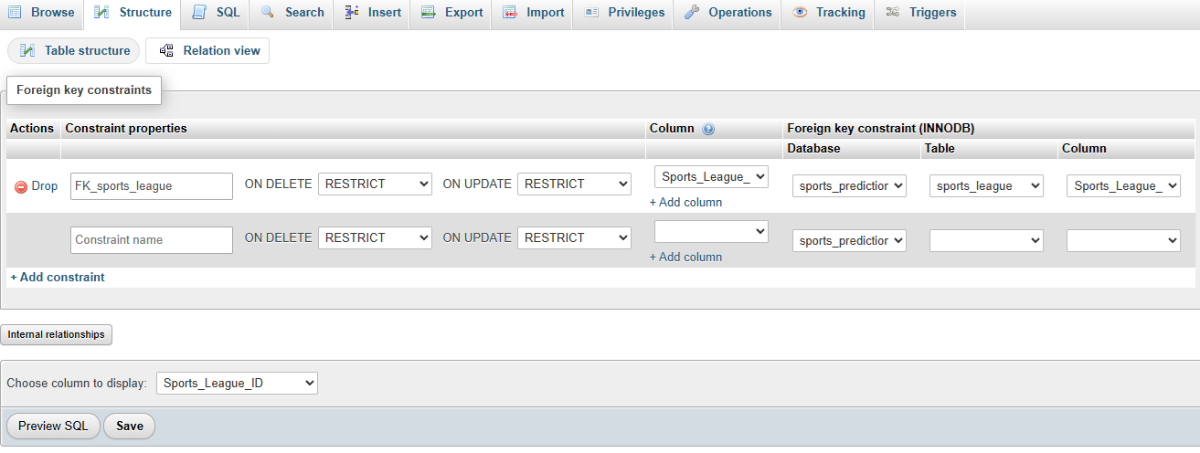
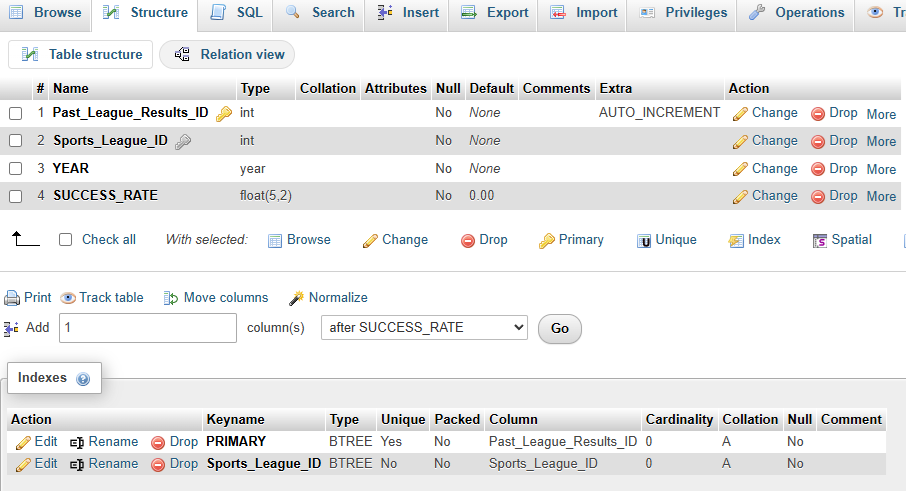
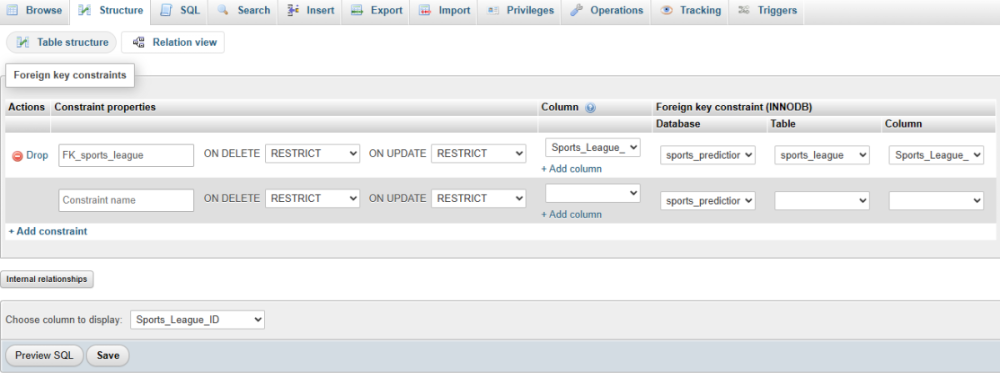
 Hello everyone. I am new here and need some guidance. I am running the latest version of Uniserver Zero as I installed it last week. I am using phpmysqladmin's UI to create my tables within my database and also to add the records within them. I have a table called 'sports_league' that contains seven records. Its primary key is 'Sports_League_ID'. I also have another table called 'past_league_results' that has it's primary key as 'Past_League_Results_ID" as well as an index field called 'Sports_League_ID" with a foreign key called 'FK_sports_league' that connects the 'Sports_League_ID' to the 'Sports_League_ID' to the Sports_League' table with the 'Choose column to display' value set to Sports_League_ID. My problem as you can see in screenshot.jpg, is that when I try to insert a new record and select the Past_League_Results using phpmysqladmin, the sports_league_ID drop-down list of the seven records displays both the League Name and also the primary key value in two separate ways. How can I fix it so that it ONLY displays the League Name and only display one set of records from the Sports_League table? Any help would be greatly appreciated! thx Tommy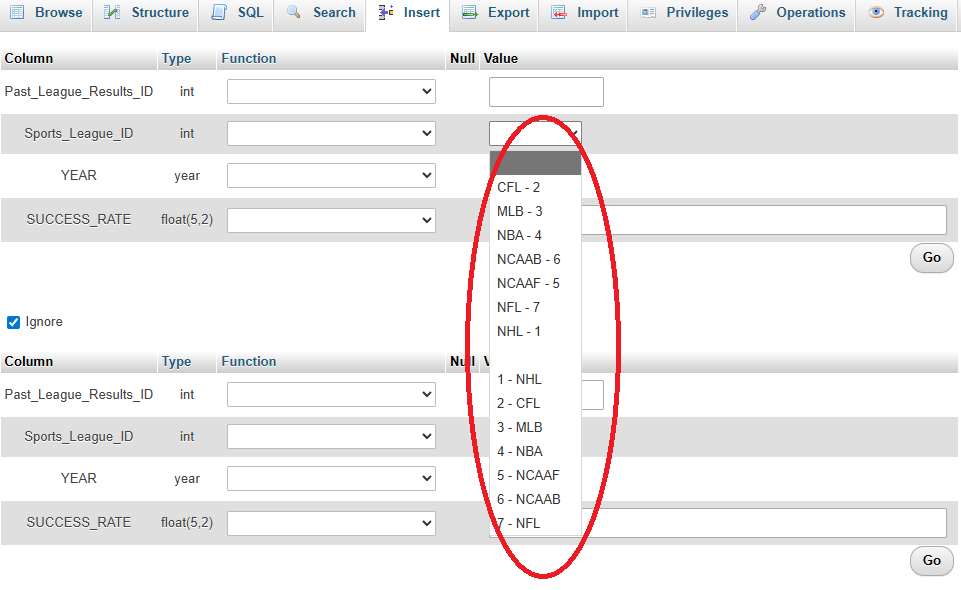
-
Tommy joined the community
-
 I'm trying Uniform Server 15.0.2 on Windows 11 to support a local Wordpress. Today's package provides phpMyAdmin 5.2.1. I updated to 5.2.3 basically following the above. The 5.2.3 zip file from https://www.phpmyadmin.net/ had some extra stuff that I didn't use. Renamed .../UniServerZ/home/us_opt1 to su_opt1 - 5.2.1, just in case... Copied all the files from folder (download), phpMyAdmin-5.2.3-english to .../UniServerZ/home/us_opt1. This overwrote most everything, but not touching config.inc.php and us_opt.ini. It also left the old RELEASE-DATE-5.2.1 while adding RELEASE-DATE-5.2.3 read-me files. Copied most of the directories (js to vendor) to us_opt1, replacing the previous folders (and contents). I did not copy the new folders, doc and examples, since they did not appear in the original installation. Restarting the UniServer console, Apache and MariaDB, I now have phpMyAdmin at 5.2.3 with prior data intact, and no nag about not running the latest version.
 -
gopher_baroque joined the community
-
 Asobel joined the community
 -
 Hello Vladimir! To install Composer correctly on UniServerZ, make sure you follow these steps: Download Composer: Ensure you have the latest version of Composer downloaded to your UniServerZ/bin directory. Set Environment Variables: Add the path to your Composer executable in the system environment variables so it can be accessed globally. Run Composer: Open the command line and navigate to your Drupal project directory, then run composer create-project drupal/recommended-project my_site_name_dir to start the installation. If you encounter any issues, feel free to ask for help!
 -
 If your menu items are stored in a database, ensure that the problematic item is correctly entered in the database. Look for any typos or missing fields. Sometimes, caching can cause issues with loading updated content. Clear your browser cache or any server-side cache that may be in use. Check the code responsible for loading the menu. Look for any conditional statements or errors that might be preventing the specific item from displaying.
 -
 To reset your menu in UniServer, you can try clearing the cache or reloading the menu configuration file. If that doesn't work, consider checking the database for any inconsistencies or errors related to the problematic item. Let me know if you need further assistance!
 -
 Is there a way to verify that the extensions are installed correctly and compatible with the PHP version I am using?
 -
 Madison Dylan changed their profile photo
 -
 This is a fairly common gotcha with Apache/Uniform Server on Windows, and it’s usually not caching so much as name-based virtual host configuration order. A few things to check carefully: Ensure NameVirtualHost / default vhost behavior In Apache 2.4 (which Uniform Server uses), Apache serves the first matching virtual host as the default. If one of your <VirtualHost *:80> blocks is missing a unique ServerName (or both are using localhost), Apache can’t reliably decide which one to serve, so it falls back inconsistently after restarts. Each vhost must have a unique ServerName (and optional ServerAlias) Example: <VirtualHost *:80> ServerName project1.local DocumentRoot "C:/UniServerZ/www/project1" </VirtualHost> <VirtualHost *:80> ServerName project2.local DocumentRoot "C:/UniServerZ/www/project2" </VirtualHost> Then map both in your hosts file: 127.0.0.1 project1.local 127.0.0.1 project2.local Avoid using plain localhost for multiple sites localhost should ideally point to one default site only. Using localhost/project1 and localhost/project2 relies on directory routing, not virtual hosts, which can conflict once vhosts are enabled. Check that httpd-vhosts.conf is included only once Duplicate includes or mixed configs can cause Apache to load vhosts in a different order on restart. Restart Apache cleanly (not just reload) Stop Apache completely from UniController, wait a few seconds, then start it again. Windows file locks can sometimes make partial restarts misleading. In short, this behavior almost always comes down to duplicate or missing ServerName entries and Apache picking a different “default” vhost each time. Once each site has its own domain name and matching host entry, the flipping should stop entirely.
 -
Daniel Kerwosvski changed their profile photo
-
 This is most likely a server/environment configuration issue, not your business logic. 1.Your include_path points to /home/us_pear/PEAR, but that directory doesn’t exist → PEAR is not installed (or installed elsewhere). 2.${US_ROOTF} is probably not being expanded, so the path becomes /home/us_pear/PEAR. 3.On Linux, include_path should typically use : as the separator, not ;.
 -
 And i asked.... How!? How do you at least comfigue Uniserver. And what ports must you open inbound and outbound.... Are there any instructions out there?
 -
 UniServer (Uniform Server) works out of the box only on your local machine. To make it accessible from the internet, you must configure both UniServer and your network/router. The message you see is normal until those steps are done.
 -
_imresizer.thumb.jpg.775a26857d42a11e37d68237e3402563.jpg) Emma Linda changed their profile photo
Emma Linda changed their profile photo -
 Thank you!
 -
 Hi As i mentioned previously, there is no way to automate any firewall rules - if there were, trojans and other virus's would be doing it. I have described the service setup and the pitfalls with the apache method. I have shared my findings, it does help to read past the first reply.
 -
 I’m actually dealing with the same issue too. I also run Uniform Server from a USB and those Windows Firewall prompts are popping up every time on first launch. I’ve been looking into either pre-adding the firewall rules or automating the service setup as well, but haven’t found the cleanest way yet. So yeah, I’m following this thread too — hoping someone who has done it before can share the simplest solution.
 -
I can relate to your struggles with swapping PHP versions in UniformServer. I’ve encountered similar issues when trying to run different versions for my Joomla sites. It can be frustrating when one site works perfectly while another fails to load properly despite being within the recommended PHP range. If you find a solution, please share it, as I’m also looking for ways to resolve these compatibility issues!
-
 Please, help me. I have windows 10 OS. I tried to start apache from console but it's failed to start. I tried to use first versione 15.0.2 and then 15.0.1 but it's the same: apache doesn't started. coul you help me? thanks a lot. Federica
 -
 After trying more other project, I chose PhpStudy - the only one can run successfully.
 -
Tody I tried to use this app and this version but also encounterd this problem on my PC which system is Windows 11. First I deem this error is arises by moderfing port, but normalizing the port did nothing. Then I visit this forum search for help. Unfortunately, these is no solution helped for me. Following some solution refered at other post: 1. Click the button: "Apache-Apache Syntax Check -t", then the console is "Syntax OK", but to start still failed. 2. Install a vc_redist.x64.exe. Failed again. 3.Use this version: 15.0.1, Failed! I am going to give up...
-
 Hi all This “Programming & Web Design” section is great for sharing and getting help on dev topics. I’m currently working with Uniform Server and I’d love to see more posts focused on integrating PHP frameworks and modern front-end techniques here. Can someone share how they’ve used it for React or Vue in a WAMP setup?